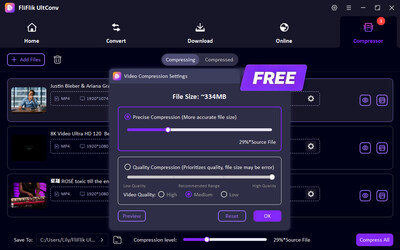
How to Compress a Video with Free FliFlik UltConv Video Compressor
PR Newswire
NEW YORK and HONG KONG, April 28, 2026
NEW YORK and HONG KONG, April 28, 2026 /PRNewswire/ -- FliFlik, a rising innovator in high-efficiency multimedia solutions, officially announces the latest feature update to its flagship software, FliFlik UltConv Video Compressor. It provides users with a professional yet effortless way on how to compress a video for free, ensuring that large media files are ready for storage saving and fast sharing.
FliFlik UltConv is a free video compressor software designed to balance minimal size and best quality. Unlike basic online compression tools that are often unstable, slow, and compress files in a fixed percentage, FliFlik UltConv provides a stable, desktop-based environment for compressing large media files. It allows you to batch-compress your multimedia files to any flexible size at 10x ultra-fast speed, ensuring maximum process efficiency.
High-Performance Features of FliFlik UltConv
FliFlik UltConv is engineered to solve the most common frustrations in media file compression. Below are the core features that define its industry-leading capabilities:
Free and Unlimited Compression: UltConv offers completely free and unlimited compression; you can process as many files as you need without hidden costs or restrictive file size limits.
Universal Support for 100+ Formats: Whether you are shrinking media files with MP4, MOV, MKV, MP3, or M4A, our software supports over 100 media formats, ensuring total compatibility with your entire library.
10x Faster Batch Processing: Equipped with state-of-the-art GPU acceleration, UltConv supports simultaneous batch processing. You can queue up entire folders of footage and compress them all at 10x the speed of standard tools, ensuring your workflow remains productive without long wait times.
Customizable Compression with Intuitive Slider: FliFlik UltConv features a smart slider that lets you freely adjust and select the exact file size and dimensions you need while maintaining optimal clarity. This ensures you achieve the smallest possible file size while preserving high-definition visual fidelity
Real-Time Quality Preview: To ensure the compression effect, you can preview the compressed quality before compression. This gives you full control over the final result, ensuring it meets your exact standards.
Pricing and Availability
Currently, the UltConv Video Compressor feature is completely free to use. For users seeking full access to premium multimedia functions—including unrestricted video and music extraction from 10,000+ sites and seamless conversion across 100+ formats—FliFlik offers flexible pricing:
1-Month plan: $19.95
1-Year plan: $69.95
Lifetime plan: $89.95
Now get 20% off for 1-Year & Lifetime plans!
Compatibility:
Windows: Windows 11/10 (64-bit)
macOS: macOS 10.15 and above
About FliFlik:
FliFlik is a brand dedicated to streamlining the digital media workflow. While many users look to us for how to make a video file smaller, FliFlik UltConv is actually an all-in-one media workstation. It empowers you to grab, convert, and compress content from over 10,000 websites, covering all your digital needs in one high-speed platform.
To learn more about FliFlik and its solutions, please visit the official website: https://fliflik.com/
This release was issued through Send2Press® on behalf of the news source. For more information, visit Send2Press Newswire at https://www.send2press.com/
 View original content to download multimedia:https://www.prnewswire.com/news-releases/how-to-compress-a-video-with-free-fliflik-ultconv-video-compressor-302756172.html
SOURCE FliFlik